And even under 16 GB of VRAM!
I know, another AMD post. Apparently this is a series now. I’ll keep going until NVIDIA sends me a DGX Station. A DGX Spark without USB4/Thunderbolt just ain’t cuttin’ it for me.
Lately, I have been doing a lot of perception-to-motion planning because of my robotics research. This has also exposed me to a lot of 2D-to-3D and real-to-sim pipelines. I’ve also been using a lot of Meta’s research, such as Segment Anything (SAM), but I’ve been blocked on using some other ones like their SAM 3D Objects model. SAM 3D takes a photograph and a mask selecting an object, then generates its 3D shape, appearance and placement. These 3D assets can then be used in simulations (minus some physics properties like mass and friction, which you still need to guesstimate). You can try it out in Meta’s official demo. It’s a really cool use of machine learning that lets you get a nice starting point for an asset you can use in a game or simulation.
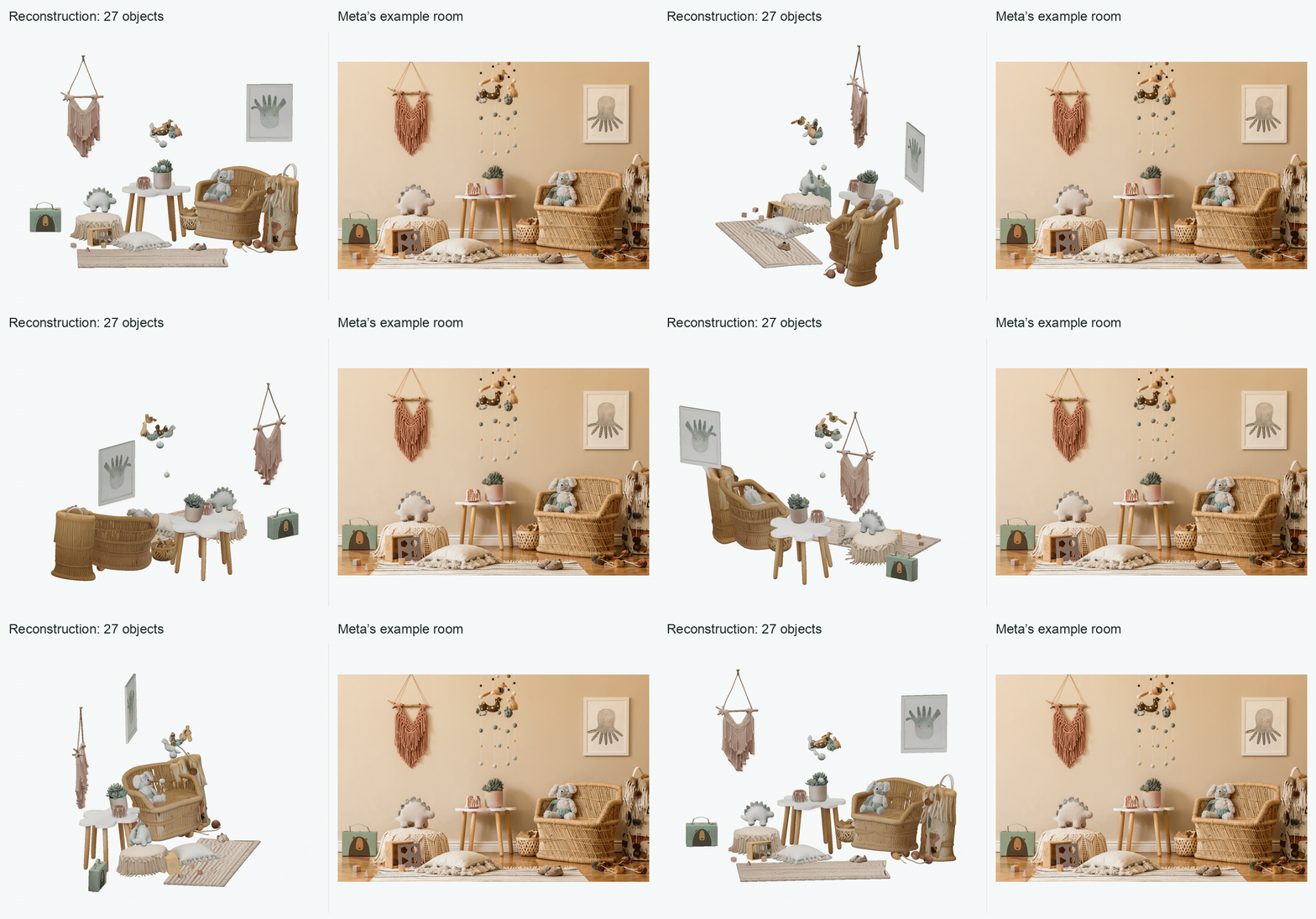
Unfortunately, SAM 3D Objects does not support running on AMD GPUs out of the box. It depends on NVIDIA-specific GPU code and the Kaolin 3D library, so simply installing PyTorch for AMD isn’t gonna cut it. I decided I’d take a stab at creating a port. This vibe coding session was completed with OMAR via Codex (GPT-6.1 Sol). Vibe coding, of course, will probably contain AI slop, so I also thought about how I would test this before contributing it to AMD Research’s Ryzers. Obviously I get the job done because I’m as clutch as Michael Jordan and like him, I like to add a little finesse in everything I do. I also optimized SAM 3D Objects for AMD hardware specifically on an AMD Radeon AI PRO R9700 and the integrated Radeon 8060S graphics (iGPU) in an AMD Ryzen AI Max+ 395, also known as the Strix Halo. Not all of the optimizations are AMD specific, so keep reading if you want to learn how to do some of them on your own hardware.
To my knowledge, this is the first publicly available SAM 3D Objects port validated on AMD Radeon GPUs, including Ryzen integrated graphics. I got the port merged into AMD Ryzers. Both GPUs reconstructed all 27 objects in Meta’s example room and assembled the scene quite nicely. I also checked 100 objects against artist-created references from Meta’s SA-3DAO dataset, which pairs photographs with 3D models that artists built by hand to match the objects in those photographs. Comparing my reconstructions with those models let me measure how closely the generated shapes matched the objects and whether optimization preserved their quality. Being that I was doing this without NVIDIA hardware, this was the main quality metric I used to check if my port was good.
My optimized SAM 3D Objects port now reconstructs one object from Meta’s example room in about 52 seconds on the Ryzen iGPU and 13 seconds on R9700. With just the changes needed to run this model on AMD hardware, the inference times were originally 137 seconds on the Ryzen iGPU and 25 seconds on R9700. That makes reconstruction on the Ryzen iGPU 2.64× faster with my optimizations. These are warm runs, meaning the model is already loaded and has already completed an untimed reconstruction to get caches nice and prepped.
I also brought the GPU VRAM needed for this model below half of Meta’s setup recommendation by making optimizations like stripping duplicate image-encoder weights, eliminating unnecessary data-type casting, and cutting down the use of temporary arrays. I ran a complete reconstruction on the R9700, including loading and export checks, with a sampled GPU memory peak of 15.69 GB. Meta’s setup recommendation calls for 32 GB of GPU memory (VRAM), so this opens up the possibility of running it on a 16 GB card. I tested using a software defined memory budget on my card so it should work but it does not hurt to have someone with a physical 16 GB card to actually try it.
Below, I’ll explain the changes that made it run on AMD and why the optimized version is so much faster and more memory efficient. I’ll also show further details on how I validated my port via the artist references (after all, wrong shapes aren’t as useful) even though I never actually ran anything on NVIDIA hardware for this experiment.
Setting up SAM 3D on AMD
The released dependencies use CUDA, NVIDIA’s GPU computing software, for sparse convolution and attention. They also pull in Kaolin, NVIDIA’s 3D toolkit. I used PyTorch built for AMD’s ROCm software stack and compatible replacements for the CUDA kernels a.k.a. the small programs carrying out GPU operations. I packaged the port in AMD Ryzers as a Docker container using PyTorch 2.12 with ROCm 7.14.
Compatibility changes
First, I needed to make Meta’s dependencies work with ROCm:
- Use ROCm PyTorch, install SAM 3D with
--no-deps, and add the required Python dependencies separately. - Replace SAM 3D’s CUDA spconv dependency with spconv-triton for sparse convolution over occupied cells in a 3D grid.
- Build PyTorch3D and gsplat with their NVIDIA GPU extensions disabled. I still needed PyTorch3D’s coordinate transforms and 3D data structures, and Meta’s code imports gsplat even when it is not rendering.
- Remove Kaolin. My runner reuses Meta’s model-loading, inference and scene helpers in
notebook/inference.py. I removed the unusedkaolin.visualizeandkaolin.render.cameraimports. SAM 3D uses FlexiCubes to generate meshes, and its mesh calculations already use PyTorch. I replaced itskaolin.utils.testing.check_tensorhelper with a local shape check. Why unused imports were there is suspect, but I’ll leave it at that.
SAM 3D’s Gaussian splats represent its reconstructed shape and appearance as overlapping 3D blobs. Disabling those extensions leaves Meta’s built-in Gaussian video renderer and some optional steps for cleaning up or texturing meshes unavailable in this build. Meta’s inference wrapper already has mesh cleanup, texture baking and layout refinement turned off, so its default reconstruction path still works. Later, I used Python and OpenGL to load the exported meshes, render a 360° camera orbit, and record the GIFs.
At this point, I’d taken care of the dependency blockers that required CUDA, so I gave it a spin. Reconstructing the stuffed bear in Meta’s example room ran out of memory on the Ryzen iGPU. The failure came from attention, which mixes features according to how relevant they are to one another. The port uses SAM 3D’s existing path through PyTorch’s scaled dot-product attention (SDPA). PyTorch chooses a GPU kernel to carry out that operation, and the choice affects how much temporary memory it needs.
To check the kernel’s effect, I ran the same build and object with and without TORCH_ROCM_AOTRITON_ENABLE_EXPERIMENTAL=1, recording PyTorch’s memory budget and peak allocation. This flag enables its existing fused ROCm attention kernels. The default iGPU kernel stores a large matrix of scores between features; fused attention combines the steps without storing that entire matrix. PyTorch reported a larger GPU memory budget on the Ryzen iGPU: 66.29 GB, versus 34.21 GB on R9700. Without the flag, the iGPU reached 49.66 GB peak allocation before another 33.31 GB allocation failed in the mesh decoder. Enabling the flag let the same build complete at 20.27 GB peak allocation. R9700 already completed without it at about 20.27 GB, using a different kernel selection.
The dependency changes plus that flag give me the minimum working AMD port used as the baseline below. I enable the flag on both GPUs in both versions to keep the attention configuration uniform.
To build this baseline, first install Ryzers and its Docker prerequisites, then use a separate checkout of the measured source revision:
git clone https://github.com/KE7/Ryzers.git Ryzers-baselinecd Ryzers-baselinegit checkout --detach 54bde2c02d0cf6098f8974d0d3f5a244c2570652ryzers build --base_path "$PWD/packages" --name sam3d-baseline sam3d
The flag is already set in that Dockerfile. Its README covers model access and reconstruction commands; use ryzers run --name sam3d-baseline to run this named build. The optimized build instructions are at the end of the post.
Before and after
Test setup
The Ryzen AI Max+ 395 shares system RAM between its CPU and integrated GPU. This is very much like the NVIDIA DGX Spark, however unlike NVIDIA, AMD ships these machines with USB4 which supports PCIe tunneling, i.e., I can connect eGPUs. This is how I am able to connect my external GPU card, the Radeon AI PRO R9700.
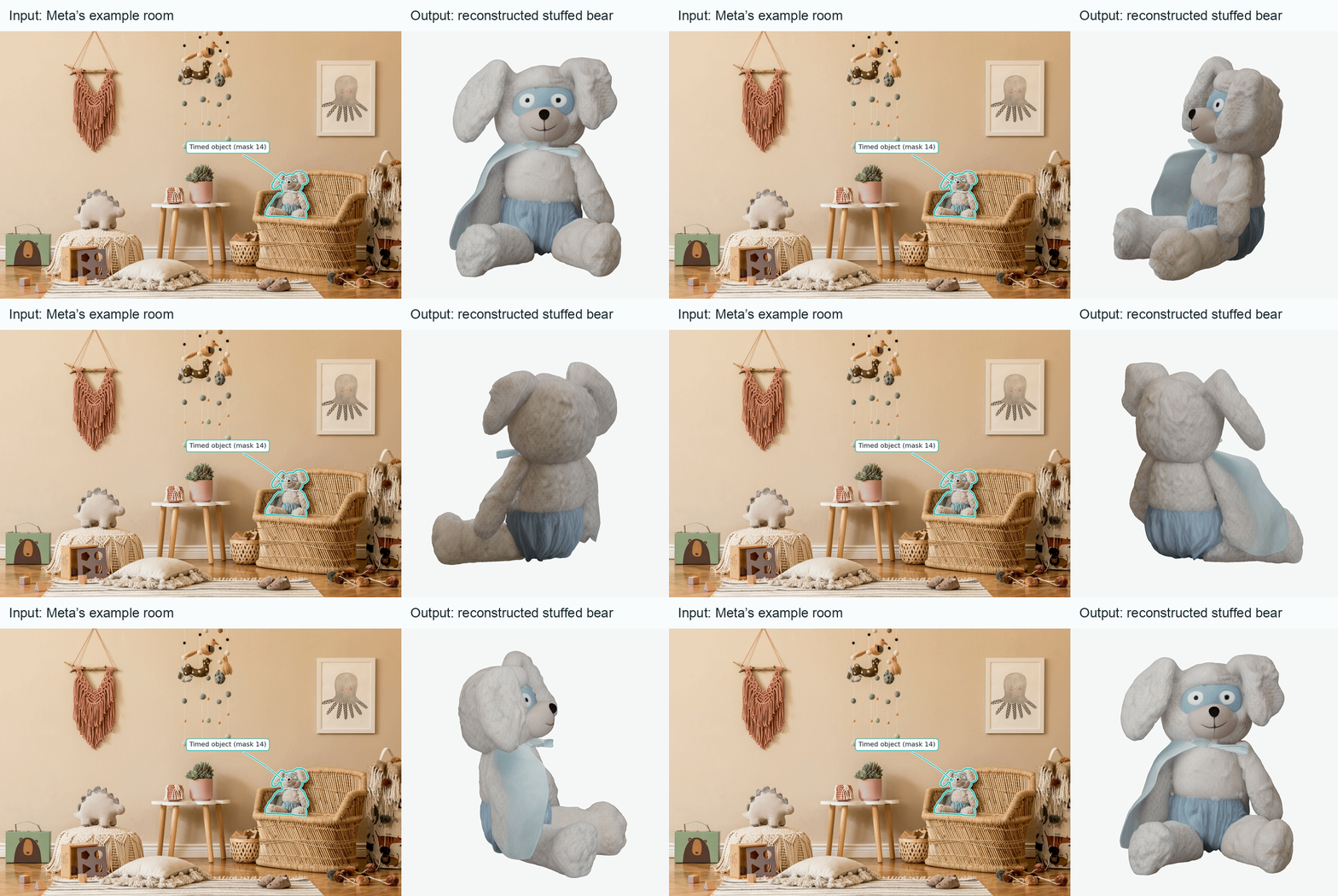
I compared two versions: the minimum working AMD port, from above, and the final optimized version. Both use the same versions of Meta’s code, dependencies and model weights. I timed reconstruction of the stuffed bear sitting in the wicker chair in Meta’s example photo (mask 14). I ran each version six times on each GPU across two fresh processes, with an untimed reconstruction in each process first to warm up caches, and then report the median. Each run uses random seed 42, 16-bit floating-point (FP16) inference and the default reconstruction steps, producing meshes and Gaussian splats.
SAM 3D uses MoGe to estimate depth from the input photograph. MIOpen, AMD’s convolution library, handles convolutions in that step and uses its default algorithm-selection mode in the minimum build. The optimized build selects MIOpen’s FAST mode on Ryzen to keep convolution algorithm selection consistent for depth inference. Both versions use PyTorch’s native GPU memory allocator and leave its optional model compiler (torch.compile) disabled.
Timing results
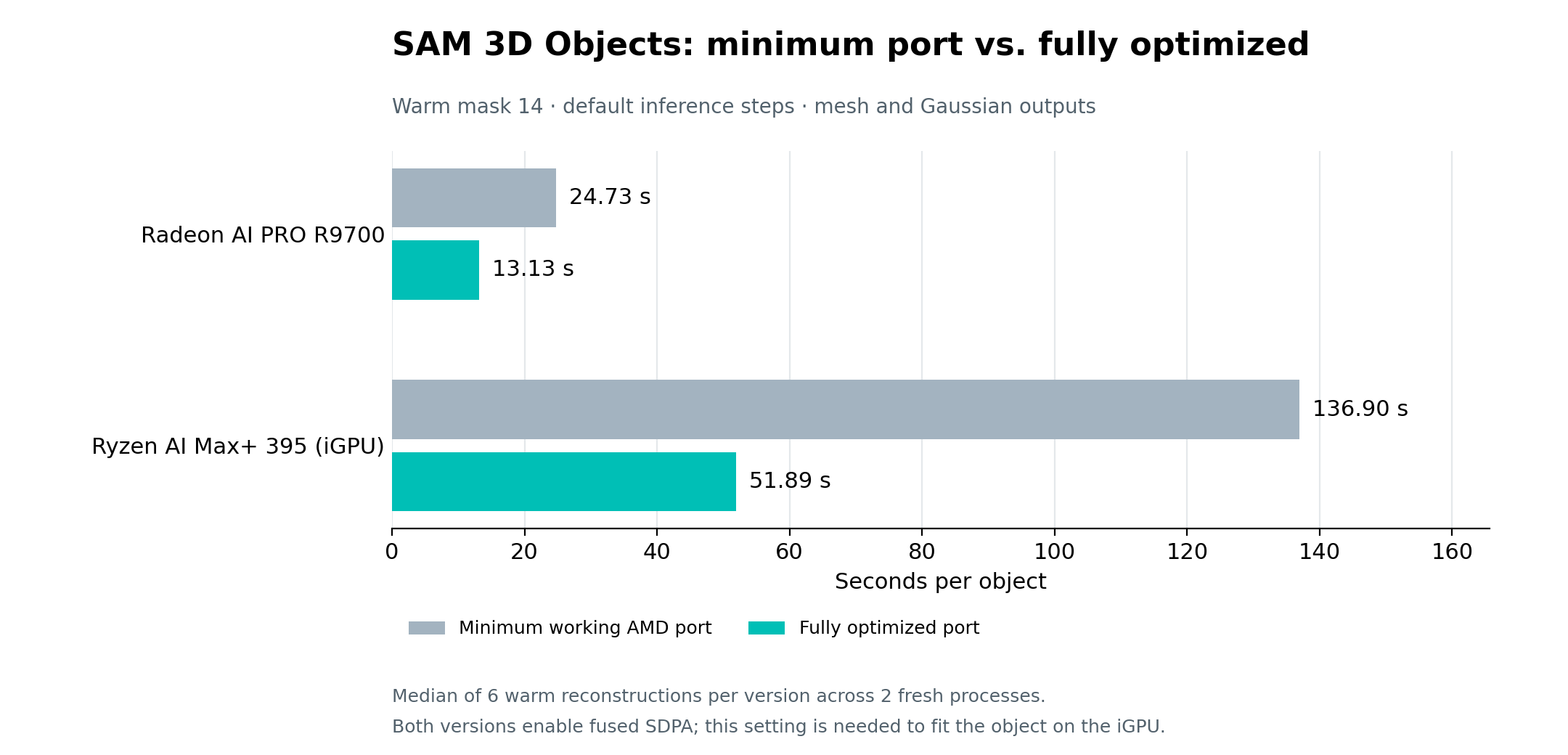
| Warm reconstruction | R9700 | Ryzen iGPU |
|---|---|---|
| Before: minimum working port | 24.73 s | 136.90 s |
| After: fully optimized port | 13.13 s | 51.89 s |
| Final range | 13.03–13.20 s | 51.42–52.59 s |
| Time saved per object | 11.60 s | 85.02 s |
| Latency reduction | 46.9% | 62.1% |
| Speedup | 1.88× | 2.64× |
Why is the optimized version faster?
SAM 3D builds an object in two stages. Geometry, also called the structure stage, predicts its coarse shape and pose: position, rotation and scale. Texture & Refinement, also called the latent stage, adds detail. Decoders then turn the internal representation into a mesh and Gaussian splats.
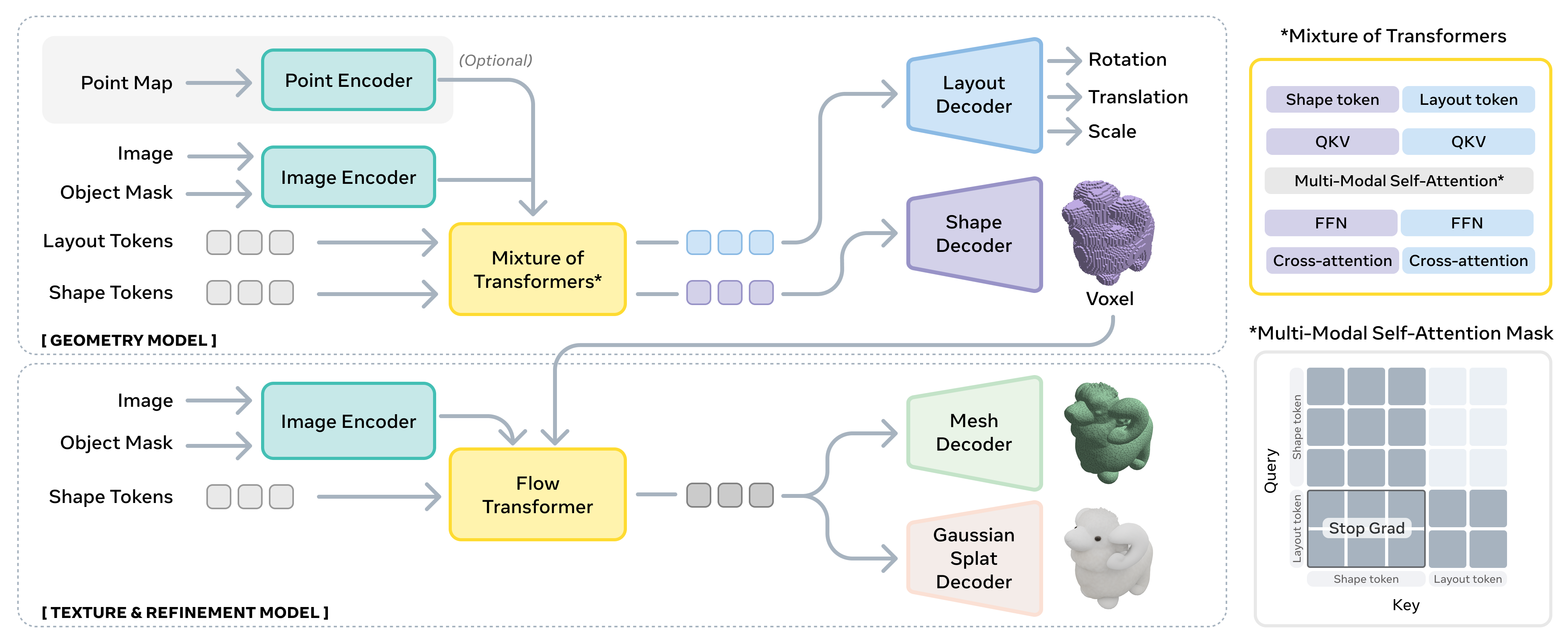
Both stages use the full image and a crop around the selected object, along with the segmentation mask for each view. The features extracted from those images guide a series of denoising steps, which turn a noisy 3D representation into the object. That guidance is called conditioning. Since the image and mask stay the same during those steps, some of the work can be reused.
Why did attention take so long?
Some of SAM 3D’s attention operates on independent blocks, such as spatial windows or separate items in a batch: features in one block should never attend to another block.
The original PyTorch attention path joins those blocks into one sequence, then builds a dense mask to block attention between them. That mask grows with the square of the total sequence length: O(N²) memory for N tokens, the feature vectors attention works with. Dense attention’s pairwise computation also scales as O(N²) at a fixed feature width. Even a single full-attention block gets a full, all-zero mask.
I broke this up. I changed it to run attention separately for each existing block. For example, take two blocks with 1,000 tokens each. They need two 1,000-by-1,000 attention problems: 2 × 1,000² = 2 million token pairs. Joining them creates one masked 2,000-by-2,000 problem: (2 × 1,000)² = 4 million token pairs. For k equal independent blocks of n tokens, the joined calculation takes O((kn)²) = O(k²n²) pairwise work, while separate blocks take O(kn²). That halves the pair count in this example and reduces it by a factor of k in general. Keeping them separate removes the large mask, skips comparisons between unrelated blocks and lets PyTorch select fused attention kernels that combine operations. The model keeps the same attention connections.
Running the blocks separately saved 4.4 seconds on R9700 and 40.8 seconds on the Ryzen iGPU, taking whole-object time from 25.1 to 20.7 seconds on R9700 and 127.3 to 86.5 seconds on the Ryzen iGPU. On the Ryzen iGPU, the decoder alone went from 12.49 to 1.31 seconds. This removes dense-mask work throughout sampling and decoding and allows different fused kernels; the timing includes both effects.
Reusing image-encoder features
SAM 3D’s image encoder extracts visual features from the input, and it was processing identical inputs more than once. I cached raw image-encoder features for repeated identical inputs within each reconstruction. On both GPUs, eight calls became four computations and four cache hits. In isolated warm comparisons, this saved about 0.4 seconds on R9700 and 0.3 seconds on the Ryzen iGPU in the latent stage. Small, but a win is a win.
Reusing conditioning projections
SAM 3D’s attention turns the image features into keys and values, numerical representations describing what information is available and what to combine. The calculations producing them are called projections. Within a denoising stage, the same image and mask give the same keys and values at every step, but those projections were being recalculated each time.
I cached those results within each sampling stage, avoiding 2,880 repeated projections per object and repeated data-format conversions. That saved 1.01 seconds on R9700 and 8.39 seconds on the Ryzen iGPU in the isolated comparisons.
Collapsing zero-context tokens
SAM 3D uses classifier-free guidance to steer reconstruction toward the image by combining predictions made with and without image conditioning. The prediction without it receives an all-zero array of context features. Every zero-input token produces the same key and value. Attention returns a weighted average, and averaging thousands of copies of the same value still gives that value.
I kept one zero-context token after checking the input and projection parameters. The image-conditioned prediction keeps all its context. This saved roughly 1.7 seconds on R9700 and 11 seconds on the Ryzen iGPU in isolated whole-object comparisons.
Kernels and launch overhead
Texture & Refinement works on features attached to occupied cells in the 3D grid, a sparse-latent representation. The existing attention kernels were slow for those feature sizes and sequence lengths. I used Triton, a language for writing GPU kernels, to run its attention with settings suited to those inputs.
Repeated small operations also pay the cost of starting a GPU kernel each time. A stage-local cache reuses converted weights when a cast (data-type conversion) is needed during structure sampling. Pointwise fusion runs element-by-element operations together, reducing GPU launches. The iGPU weight layout stores the same matrix values in an arrangement that works better for multiplication. Passing attention’s query, key and value arrays separately avoids repacking them after normalization, which rescales feature values, in the sparse-latent stage’s full-attention path.
The feed-forward layers in Texture & Refinement update each token’s features independently between attention operations. I used PyTorch’s native fusion to combine the first matrix multiplication, bias addition and tanh-GELU activation in the latent stage, avoiding separate GPU launches and intermediate arrays. The second matrix multiplication then uses that result. This reduced the measured operation’s latency by about 8% on R9700 and 10% on the Ryzen iGPU, saving 0.31–0.35 seconds in the Ryzen iGPU latent stage, less than 1% of a whole reconstruction.
Persistent graphs replay recorded GPU operations to reduce launch overhead. For the structure stage on R9700, they saved 0.05 seconds and retained 3.85 GB more memory, so I left them disabled.
The remaining tweaks I tested saved little time or used too much memory, so I stopped tuning here.
What each change saved
To isolate which changes helped, I also timed individual changes and small groups of changes with extra diagnostic recording. Each row has its own control and starting configuration, so the main timing table gives the overall before-and-after speedup.
| Change | Work removed | R9700 | Ryzen iGPU |
|---|---|---|---|
| Independent attention blocks | Dense masks and masked-out token comparisons | 25.1 → 20.7 s | 127.3 → 86.5 s |
| Conditioning cache | Repeated image casts and key/value projections within a denoising stage | 21.31 → 20.30 s | 88.14 → 79.75 s |
| Triton attention for the sparse-latent stage | Attention kernels poorly suited to the actual FP16 array shapes | 20.92 → 17.53 s | 79.42 → 67.89 s |
| Fused latent normalization and cached weight casts | Separate elementwise kernels and repeated parameter conversions | 18.09 → 16.23 s | 68.39 → 65.01 s |
| Pointwise fusion, iGPU weight layout and launch tuning | Kernel launches and a slower feed-forward matrix layout | 16.05 → 15.89 s | 64.97 → 64.05 s |
| Compact zero context, feature reuse, separate attention inputs, storage and activation fusion | Repeated conditioning work, image-encoder calls, array packing and kernel launches | 15.66 → 12.99 s | 63.14 → 50.59 s |
Optimizing SAM 3D’s memory use
Now that I’d spent all this time optimizing latency, I turned my attention to memory to see what I could squeeze out there.
Sharing image-encoder weights
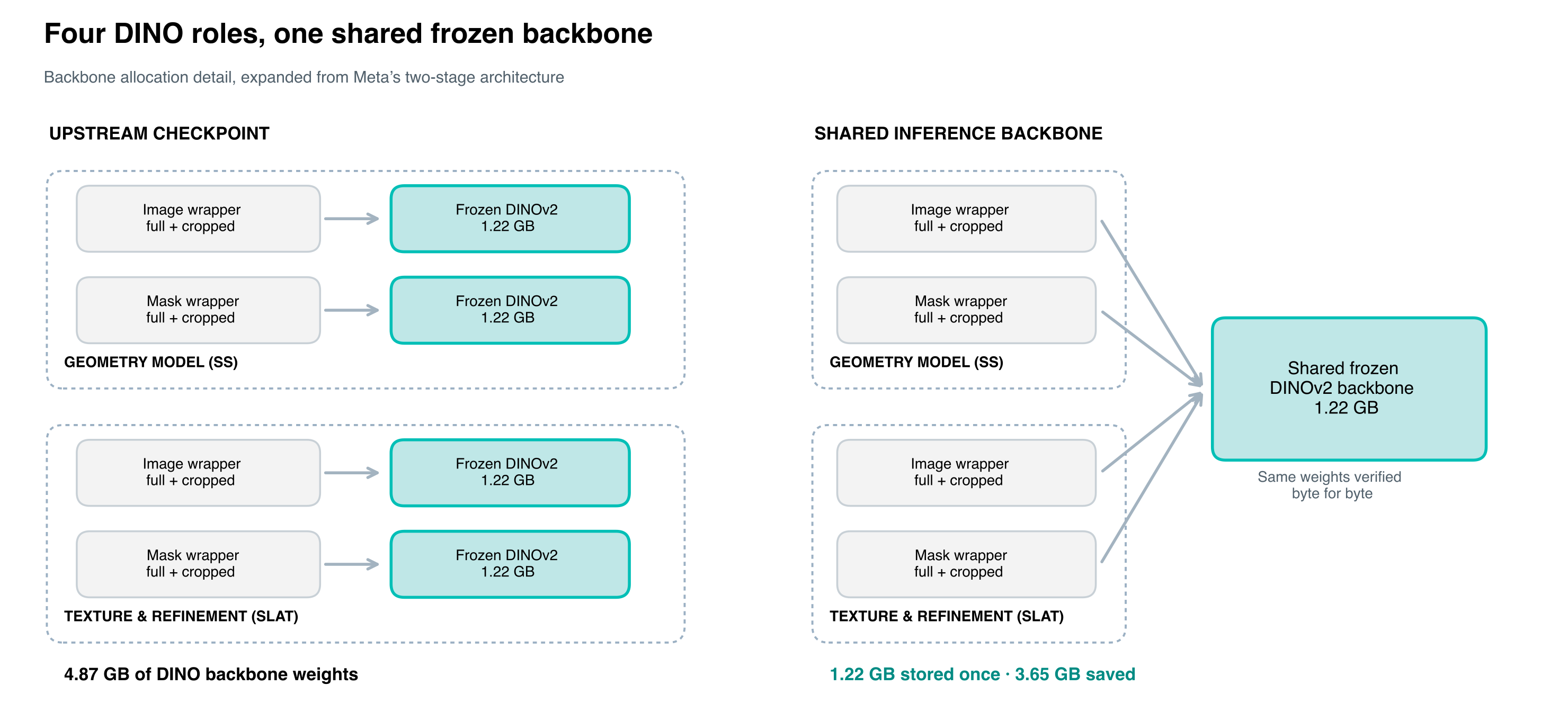
SAM 3D’s image and mask encoders use DINOv2, a network that turns their inputs into visual features to guide reconstruction. The released pipeline creates image and mask encoders for each reconstruction stage, and each constructor loads its own DINOv2 backbone. That gives four copies of the same network. The weights in all four copies are byte-for-byte identical and stayed fixed during inference. Sharing one copy removed 3.65 GB of duplicate weights on both GPUs. Each encoder keeps its own preprocessing and feature selection.
Removing repeated weight conversions
Inference already used FP16. I found that the structure-stage linear layers stored fixed weights in FP32 and converted them to FP16 on every call. I stored those weights directly in FP16 and reused them, so the multiplications receive the same FP16 values they already used while saving the casting time and memory wasted. Normalization parameters stayed FP32.
Compacting the zero-conditioning context
The cache I added during latency tuning keeps attention keys and values in GPU memory so they can be reused between denoising steps. For the prediction without image conditioning, the zero-context tokens produced repeated copies of the same keys and values. Keeping one token also reduced the data I had to retain, shrinking that stage’s conditioning cache from 3.04 to 1.56 GB on both GPUs.
Sharing the packed attribute array with the PLY writer
SAM 3D already packs its Gaussian attributes, such as position, color and opacity, into a NumPy array. The original PLY writer then built Python tuples for every Gaussian and used them to fill another array for export. I let the writer read a structured view of the existing packed array. In the isolated packing test, peak CPU RAM held by the process fell from 12.78 to 1.88 GB, with identical attribute bytes.
Memory savings
For the same stuffed bear reconstruction, the GPU memory holding the model’s weights and intermediate results, PyTorch’s “allocated” figure, fell from 20.27 GB in the minimum working port to 14.76 GB in the final optimized port on both GPUs. That saves 5.51 GB, excluding model loading.
| Change | Measured memory result | Device |
|---|---|---|
| Share frozen DINO backbones | 3.65 GB fewer stored weights | Both GPUs |
| Store fixed linear weights in FP16 | 1.91 GB fewer stored weights; normalization stays FP32 | Both GPUs |
| Compact zero-conditioning context | Stage conditioning cache 3.04 → 1.56 GB; another stage still set the original global peak | Both GPUs |
| Reuse the packed PLY attribute array | Isolated packing test: peak CPU RAM held by the process 12.78 → 1.88 GB, with identical attribute bytes | CPU |
Testing the 16 GB budget
I also checked whether the memory savings held up through a complete run, including model loading and export. PyTorch’s reserved figure includes both live allocations and the spare blocks it keeps for reuse. In the optimized port’s stuffed bear timing runs, with no PyTorch memory cap, that reservation reached 20.95 GB on both GPUs.
I set a 15 GB PyTorch allocator cap on R9700 before loading the model, leaving room for GPU memory outside PyTorch, and used the native allocator with max_split_size_mb:128. That setting reduces fragmentation, where free memory is scattered across blocks too small for the next allocation. Two fresh processes completed model loading, the default reconstruction steps, both decoders and export validation for the same object. PyTorch documents the memory limit and split-size control.
To include GPU memory outside PyTorch’s allocator, I sampled AMD’s per-process driver counters every 50 milliseconds in one of those runs. Requested VRAM and resident VRAM (memory actually held on the GPU) both peaked at 15.69 GB, with no recorded eviction from GPU memory. PyTorch’s own peak allocation was 14.77 GB, and its reservation was 14.99 GB. I also checked that the tighter budget preserved the geometry. Both capped runs’ exported meshes passed the geometry check against a separate 16 GB-cap control: the 99th percentile of sampled surface distances stayed below 0.5% of the object’s bounding-box diagonal.
The latency table uses the uncapped configuration. Again, this doesn’t prove that SAM 3D will run on a 16 GB card but it’s pretty damn close!
Memory for the full room
Meta’s example room includes 27 object masks for the same photo used in the timing runs. I reconstructed each selected object and used SAM 3D’s predicted positions, rotations and scales to assemble the objects shown in the opening GIF. This requires keeping each object’s Gaussian splats in memory until assembly. In the optimized port’s full-room run without a PyTorch memory cap, the Ryzen iGPU’s peak allocated memory including assembly was 15.89 GB. R9700 also completed assembly, and its recorded 15.89 GB peak comes from the individual-object runs.
Packing the scene for export
Together, those 27 objects produced about 13.6 million Gaussian splats. I saved the combined scene as a PLY file, which means packing each splat’s position, color, opacity and other attributes into the file’s records. In the isolated CPU packing test, sharing the packed array with the writer took that step from 17.98 seconds to 0.062 milliseconds. Full export also includes attribute preparation, transfers from the GPU and writing the file.
How do I know the port works?
Shape quality
After changing SAM 3D’s dependencies and kernels, I needed to check that it still produced the right shapes. I compared the generated shapes with artist-created meshes in Meta’s SA-3DAO dataset. Those meshes provide a reference for the full object, including the parts hidden from the camera.
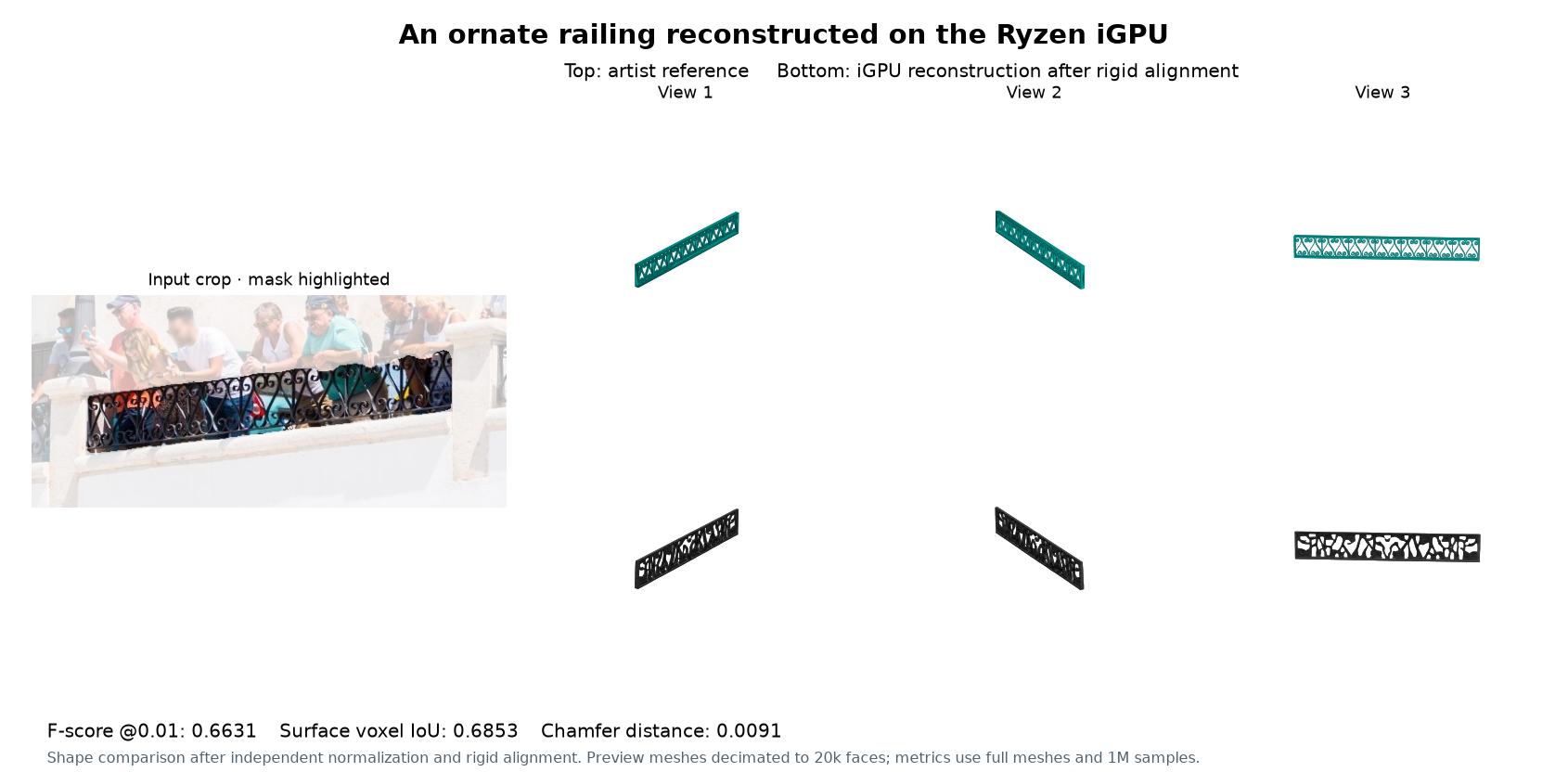
I ran all 100 public reference objects, from 81 input images, through the unoptimized and optimized AMD code on both GPUs. SAM 3D received the photograph and mask, with depth estimated by MoGe. All 400 reconstructions completed, with valid meshes and finite Gaussian centers.
For the numerical comparisons, I matched the runtime settings in both versions to isolate the code changes: fused attention enabled, and MIOpen FAST on the Ryzen iGPU.
To compare shape independently of placement in the scene, the evaluator centers and scales each mesh into [-1, 1], preserving its proportions, aligns it rigidly with the reference and samples one million surface points. F-score at distance 0.01 measures how closely and completely those points match. Surface voxel intersection over union (IoU) measures overlap on a 64³ grid. Higher is better for both. Chamfer distance measures nearest-surface distances, and Earth Mover’s Distance (EMD) measures the cost of moving the sampled surface mass into the reference shape. My local EMD approximation represents that mass with weighted grid-cell centroids. Lower is better for those two. These follow the paper’s shape-metric definitions.
F-score runs from 0 to 1. A score of 1 would mean every sampled point on each surface is within 0.01 of the other surface. After normalization, that tolerance is 0.5% of the object’s longest dimension, so small surface offsets can lower the score even when the object looks recognizable.
The paper’s row comes from Meta’s Table 2, where the other models score 0.1399–0.1629 on F-score. That gives my scores around 0.21 some context. Meta’s results cover its 1,000-object benchmark, while mine cover the 100 public references with a local evaluator. Differences in the objects, alignment and distance-metric implementations prevent a direct ranking from these numbers.
| GPU / version | Mean F-score | Mean voxel IoU | Chamfer | EMD |
|---|---|---|---|---|
| Meta’s SAM 3D, paper evaluation (1,000 objects) | 0.2344 | 0.2311 | 0.0400 | 0.1211 |
| R9700, unoptimized AMD code | 0.21437 | 0.22265 | 0.060131 | 0.218852 |
| R9700, final optimized port | 0.21465 | 0.22300 | 0.060088 | 0.218561 |
| Ryzen iGPU, unoptimized AMD code | 0.21671 | 0.22573 | 0.060391 | 0.221372 |
| Ryzen iGPU, final optimized port | 0.21602 | 0.22546 | 0.060281 | 0.219528 |
Before scoring, I set an acceptable mean change of at most 0.005, or half a percentage point, in either direction for F-score and IoU. The paired 95% confidence intervals stay inside that margin, both when resampling individual objects and when grouping objects from the same photograph. Both GPUs passed the quality-preservation check. Chamfer and EMD means are slightly lower after optimization; the confidence interval for the EMD change includes zero.
Numerical agreement
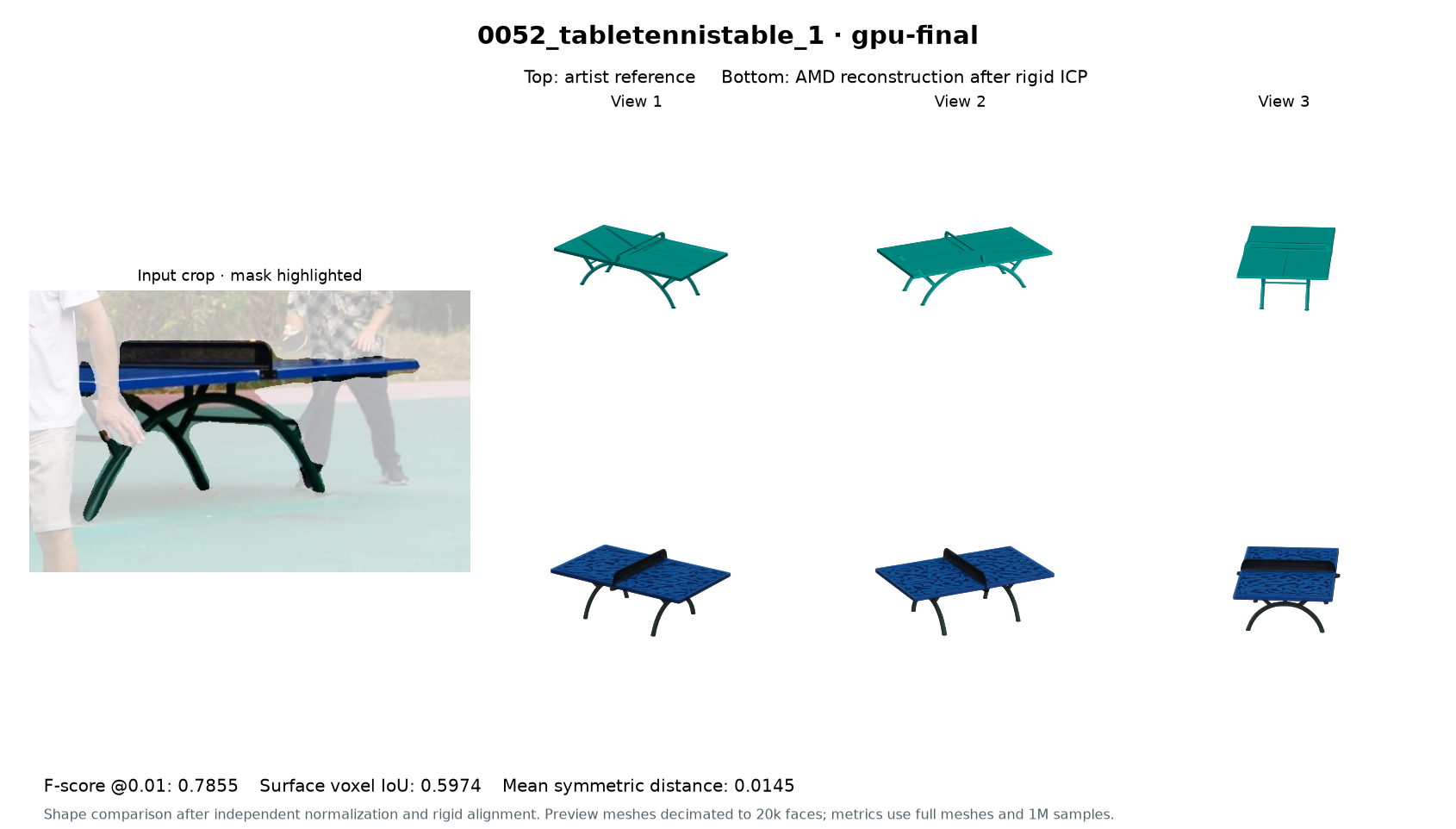
Average shape scores can hide changes to individual reconstructions. I also compared the unoptimized and optimized outputs under the same runtime settings. I required exactly matching occupied grid coordinates and pose, root-mean-square (RMS) feature differences no larger than 1% of the reference RMS, and a mesh-distance limit of 0.5% of the bounding-box diagonal at the 99th percentile. This percentile, often called p99, covers 99% of the sampled distances; scaling by the enclosing box’s diagonal makes the limit relative to the object’s size. All 100 pairs on each GPU meet those limits.
Changing where FP16 values are rounded can push a structure prediction across the threshold that marks a grid cell as occupied. I rejected broader fusions when changing that rounding altered occupied cells or pose. The final pointwise kernels keep intermediate rounding, and the Ryzen iGPU keeps PyTorch’s structure-stage normalization, which rescales feature values.
Checking replacement operations
Both AMD versions use spconv-triton, so I checked it against 39 recorded CUDA reference cases from its tests. I checked replacement attention, normalization and fused feed-forward operations against the original PyTorch operations and independent CPU float64 (double-precision) calculations. The higher-precision CPU calculations provide a separate reference for the arithmetic itself.
Fresh-process checks
The timing runs above start after warmup. I also checked the first reconstruction after model loading in fresh Python processes. All 24 fresh-process runs on each GPU completed and passed the finite-output and export checks, covering 12 inputs twice.
What did all this vibe coding cost?
My recorded token usage adds up to $84.68 at API rates:
| Token category | Usage (tokens) | Rate per 1M tokens | Cost |
|---|---|---|---|
| Uncached input | 7,510,380 | $2.00 | $15.02 |
| Cached input | 488,790,656 | $0.10 | $48.88 |
| Output | 2,078,215 | $10.00 | $20.78 |
| Total | – | – | $84.68 |
Usage snapshot: 2026-10-23 18:56 UTC. Estimated from session logs at API rates, with reasoning tokens included in output.
Try it on your machine
You can install the port from AMD Ryzers. The Ryzers installation guide covers getting started.
git clone https://github.com/AMDResearch/Ryzers.git Ryzers-sam3dcd Ryzers-sam3dryzers build --base_path "$PWD/packages" sam3dryzers run
The default ryzers run command checks imports, GPU access and a small sparse convolution against a CPU reference. To reconstruct an object, accept the model license, export a Hugging Face token with access, then run:
# Reconstruct the stuffed bear in the wicker chair (mask 14).ryzers run "python /ryzers/test_sam3d.py"# Reconstruct all 27 objects and assemble the scene.ryzers run "python /ryzers/test_sam3d.py --all-masks"
The runner exports GLB meshes with vertex colors and PLY Gaussian splats for use in a viewer that supports those formats. The first reconstruction takes longer because it downloads weights and compiles Triton kernels. The package README covers GPU selection, persistent caches and output files.
Give it a try and share pictures of the assets you create in the comments! Tell me what hardware you used and how it ran, especially if you have a 16 GB Radeon card.
If you found this post useful in your research or work, please cite it as:
@misc{elmaaroufi2026sam3damd, title = {Running {SAM 3D Objects} on {AMD}}, author = {Karim Elmaaroufi}, year = {2026}, url = {https://kael.tech.blog/?p=422}}


Leave a Reply